HTTPS Cipher Mismatch Error

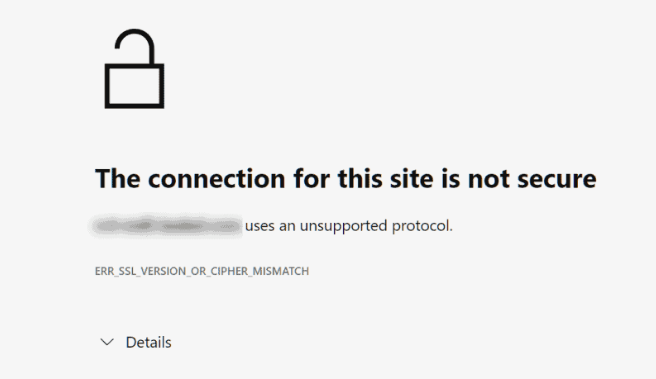
The “cipher mismatch error” typically occurs in the context of secure internet connections when there is a mismatch between the encryption algorithms supported by the client (usually a web browser) and the server it is trying to connect to. This issue prevents the establishment of a secure and encrypted connection, leading to an error message being displayed to the user.

Besides network error, common cause could be due to outdated web browser, outdated server SSL/TLS Configuration, server misconfiguration, expired SSL/TLS certificates and incompatible cipher suites.

Much has changed since 2021 after the disabling of support for TLS1.1. Many modern browsers no longer support any SSL/TLS version prior to 1.2.

connection not secure

There may be reason that you would want access to an old router or firewall, to access some old configuration, to backup config or check network info.

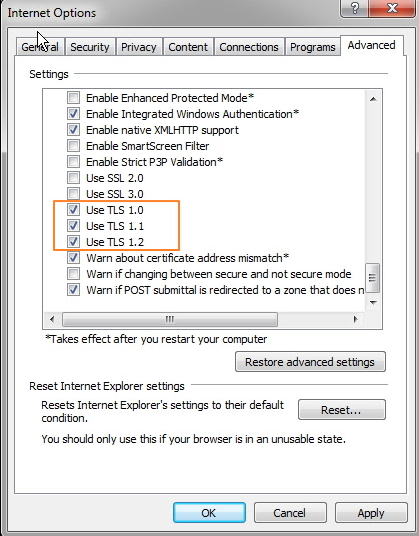
enabling tls 1.0

You may need to enable TLS 1.0, TLS 1.1 and for even older router SSL protocols in order to access the router’s web admin portal. Just remember to reverse the process once you’re done.

click error

You may also need to use Internet Explorer (no longer available in Windows 11) as all newer versions of Chrome/Firefox/Opera do not support the older protocols.

If you’re insistent on not using IE, you may need to look for versions prior to Chrome 84, Edge 84, Firefox 78, & Safari 14 in order for TLS 1.0 to work.

Malicious Linux Trojan Exploits WordPress Vulnerabilities to Hack Websites

Doctor Web, an anti-virus company, has uncovered a malicious Linux program called Linux.BackDoor.WordPressExploit.1 that targets websites using WordPress CMS. The malware exploits 30 vulnerabilities found in various plugins and themes for WordPress. If websites are using outdated versions of these add-ons without crucial fixes, the malware injects malicious JavaScript into their pages. This results in users being redirected to other websites when they click on any area of the attacked page.

The trojan is remotely controlled by cybercriminals, allowing them to attack specified websites, switch to standby mode, shut itself down, and pause logging its actions. It primarily focuses on hacking WordPress-based websites and injecting malicious scripts into their webpages by using known vulnerabilities in plugins and themes. The trojan collects statistics on its attacks and reports back to the C&C (command and control) server.

Additionally, Doctor Web discovered an updated version of the trojan called Linux.BackDoor.WordPressExploit.2, which has some differences in C&C server address and the list of exploited vulnerabilities.

To protect against this threat, website owners are advised to keep their WordPress platform and all its components, including third-party add-ons and themes, up-to-date. Strong and unique logins and passwords should also be used for website accounts.

WordPress plugins vulnerable are unpatched version of:

  • Brizy WordPress Plugin
  • FV Flowplayer Video Player
  • WooCommerce
  • WordPress Coming Soon Page
  • WordPress theme OneTone
  • Simple Fields WordPress Plugin
  • WordPress Delucks SEO plugin
  • Poll, Survey, Form & Quiz Maker by OpinionStage
  • Social Metrics Tracker
  • WPeMatico RSS Feed Fetcher
  • Rich Reviews plugin

Worry about insufficient IT security? Protect your corporate network with Dr Web Security Suite now.

Apple released “Rapid Response” patch to fix a second zero-day

Apple released an emergency bug fix, known as the Rapid Response patch, to address a web-browsing security hole used in real-world spyware attacks. The bug, identified as CVE-2023-37450, could lead to arbitrary code execution and had reportedly been actively exploited. The attack involved a look-and-get-pwned technique, where simply viewing a malicious web page could invisibly implant malware on the device without clicking or approving any pop-ups.

The update fixed the WebKit bug and another kernel-level code execution bug, identified as CVE-2023-38606. These updates were released for various Apple operating systems, including iOS, iPadOS, macOS, tvOS, and watchOS.

Users are advised to promptly download and install these updates to protect against known and potential exploits. Additionally, these updates addressed other cybersecurity flaws, including elevation-of-privilege bugs and data leakage flaws. It is crucial to keep Apple devices up to date to safeguard against current and future threats.

Microsoft’s Report on Storm-0558 Cyberattack and Mitigation Measures

Microsoft published a report called “Analysis of Storm-0558 techniques for unauthorized email access.” The report revealed a cyberattack on approximately 25 organizations, including government agencies and consumer accounts in the public cloud. Although only 25 organizations were attacked, it could have affected many individuals as some government bodies employ a large number of people.

The attack exploited two security flaws in Microsoft’s back-end operations, which the company could fix internally without requiring client-side software updates. The attack used unauthorized access to victims’ Exchange data via Outlook Web Access (OWA) using illicitly acquired authentication tokens.

The attackers managed to use fraudulent email interactions to sneak into the victims’ systems, indicating they had compromised the process of creating authentication tokens. They were able to generate fake authentication tokens that passed Microsoft’s security checks, leading to unauthorized access.

Microsoft’s threat hunters identified the attack’s nature and concluded that the affected customers’ list is exhaustive. They have taken measures within their cloud service to address the issues and disown stolen signing keys.

For those not contacted by Microsoft, it is likely they were not affected. However, those involved in IT should remember the importance of applied cryptography, security segmentation, and thorough threat hunting to ensure comprehensive cybersecurity.

Malwares & Security News

WEBROOT

RSS Error: Retrieved unsupported status code "404"

SOPHOS

RSS Error: A feed could not be found at `https://nakedsecurity.sophos.com/feed/`; the status code is `200` and content-type is `text/html; charset=utf-8`

F5

DR WEB

Malware Removal Solution

Malware is a huge issue when everyone is connected virtually in someway.

It can also be a ransomware that encrypt your system and allow remote access to your system and your corporate network.

Most come with a payload to spread itself to other users in your environment or associates in your contact list.

Removal is difficult as some malwares are rootkits, meaning they start themselves as a system service.

Ever get those anti-virus prompt of virus removal that keeps coming up after removal? That is likely a rootkit malware. Usually this will require creating a boot disk and using an image from the antivirus company that scan through your hard disk without starting Windows.

Malware Removal then System Repair? Why not do both with just one software?

There may be system file damage, traces of temp files of viruses/spywares waiting to reload and system registry cleaning up to be done.

Instead of using a magnitude of software to clean and optimize your, why no just use software to achieve this.

Powerful technology that secures and safely repairs any PC to an optimized state. It’s the one software any PC user ever needed.

Get the complete system solution here:

  • Remove malware threats
  • Detect dangerous websites
  • Restore max performance
  • Free precious disk space
  • Replace damaged WinOS files

Don’t take any chances, repair the damage NOW Download Here!

Malwares in the wild now includes Nevada ransomware, Python RAT, HeadCrab malware, PlugX malware with the last one being quite rampant.

We provide virus and malware removal service, however note that decrypting ransomware is not possible.

While generic routers don’t differentiate malicious outbound traffics from legit ones, a good hardware firewall at your network perimeter can generally detect suspicious activities on endpoints.

You can contact us for firewall solution catered to your environment. If you require malware removal service, please contact us at +65 96944441.

Domain registration service

What are the important features and precautions when looking to register domain?

  1. .com are the commonest but lacks choice of domain name due to demand.
  2. Less popular extension like .info, .site are available but finding another registrar supporting it will be harder.
  3. ccTLD is country coded and requires local presence. (e.g. .cn requires resident ID or business license)
  4. .com.sg domains requires verification done via Singpass/Corp Singpass from registered owner of business.
  5. Fast support for domain reseller or registrar is important too. We provide local support in Singapore.

Once you have decided on buying a company domain, you have to decide if you want a .com domain ( which usually don’t have much two phrase terms available) or a .com.sg domain (.sg cctld which is costly but there are more available choices for single phrase term or high-value keywords in it.)

There are restriction on ccTLD .SG domains as it requires local business presence. A proxy service may be needed for this and may cost more than the registration fee.

We provide a search option for you to find and register a ideal domain of your choice here.

We are also providing you the assistance you require to set it up seamlessly.

Besides the choices available, there are also other TLDs and ccTLDs which may be more similar to your company’s name with lesser demand. Our domain search only covers .com, .net, .org, .biz and cctld .com.sg, .com.my.

Some of the cheapest ones that are below US$10.00 are .top, idn.top, .my.id, .biz.id, .cyou, idn.cyou, .icu, .co.in, .net.in, .org.in, .click, .link, .sbs, idn.click, idn.link, .gq, .work, idn.work, .us

Check with us if there are any specific domains that you want not in the list. We will be happy to help.

Special promotion for com.sg domain – register for 2 years @ $49.00/year.

(valid for renewal of existing sg and com.sg domain too)

Email only setup

Exchange Online vs In-house Mail Server

A critical part of business operation is email & continuous innovation has to be offered by providers in order to deliver more features & better reliability to stay ahead of their competition.

Complexity of regulatory laws, constant changes and updates, high cost of maintaining of existing infrastructure, relying on highly technical support staff to support it are issues that push changes from in-house mail solution to hosted solution.

Exchange Online offloads the bulk of workload from in-house IT support personnel and provides better adaption/scalability to changes at fix subscription cost and no hardware investments.

Users are given the level of functionalities similar to mail hosted on in-house servers, support staff can still easily manage their resources while retaining control and with AD integration feature.

Exchange Online is similar to in-house Exchange server without the hardware layout. Tapping on the experience of Microsoft internal messaging systems to provide seamless integration with customer’s existing IT needs, its base features already include high mailbox space, push feature, better security that used to be only available to in-house Exchange server.

Exchange Plan 1 @ $68.00 per user per year – excluding shared mailbox/distribution list which is at no cost.

For enquiry on implementing and tailoring of this services to your company’s requirement, contact us by filling the following form and we will get back to you.


    Identifying Phishing and Mitigating It

    Most phish attempts start from obtaining users’ passwords then proceed to downloading of payloads so that the end systems can be controlled remotely.

    Attacker subsequently gathers info to propagate infection, disables security and attempts privilege escalation (eg. dumping payloads to vulnerabilities within the network). It may also includes encrypting of critical data (typical ransomware attack) then requesting payment to decrypt them.

    The result of a successful phishing attack is usually targetted at causing financial losses but its impact entails far more damage.

    Impersonating colleagues

    One scenario may be a junior staff receiving instruction from their manager claiming to be overseas and instructing his/her staff to urgently remit money to a bank account due to a last minute agreement/purchase.

    In this scenario, the manager account is compromised and the pepertrator is monitoring the account and send the phishing email using similar signature and writing style to trick the recipient to pay an unknown party.

    The attempt would be for a amount that is large enough but yet not trigger a phone call to the manager.

    Impersonating suppliers

    Another scenario would be, when a customer’s email account is compromised, it is monitored for correspondence between the compromised account and his/her suppliers.

    The perpetrator then registers a misspelled domain (1 as L or I, I as L) that is similar to domain of one of the suppliers that has bigger transactions with the customer.

    Subsequently, a phishing email is then sent to the compromised account claiming to be from the supplier using the mispelled domain registered. The phisher the impersonate as the supplier, requesting any upcoming payments to be sent to a different bank account (under a different name) citing issues with their bank.

    If successful, both customer and supplier will suffer financial loss (one from not getting paid and the other from paying to an unknown party).

    Mitigation

    In above scenarios, enabling MFA – where logins are challenged with a code sent to registered mobile number or via authenticator, may alleviate the issue.

    MFA may be also be configured to be required only when users are signing in from unfamiliar IP addresses outside of their corporate network.

    It would be ideal to prevent getting compromised from the start by implementing firewall web filters preventing users from reaching a phish site.

    There are also phishing simulation (Defender for Business for Microsoft 365) that will simulate attacks to train users detect emails that looks like phishing attempts. (For users that fail the simulation, they may be requested to go for a friendly coffee session – aka retraining on how to detect phishing.)

    IT department may also geo-target the authentications to be allowed only from within a fixed number of geolocations and monitor audit logs for malicious attempts and react accordingly.

    Phishing attempts usually start with a forged email with a link for users to authenticate and then initiates an install of malware to the system.

    Phishing/malware links can be blocked/prevented using a mix of firewall web-filtering and application layer control.

    Don’t have MFA/2FA? Synchronization of emails taking too long? – contact us to sign up for Office 365.

    If you require reviewing or securing your network, feel free to contact us. We will be happy to assist you.

    A Microsoft-based phish simulation tool is available with Microsoft Defender Plan 2. It is ideal for administrators that would like to run simulations prior to conducting training to users.

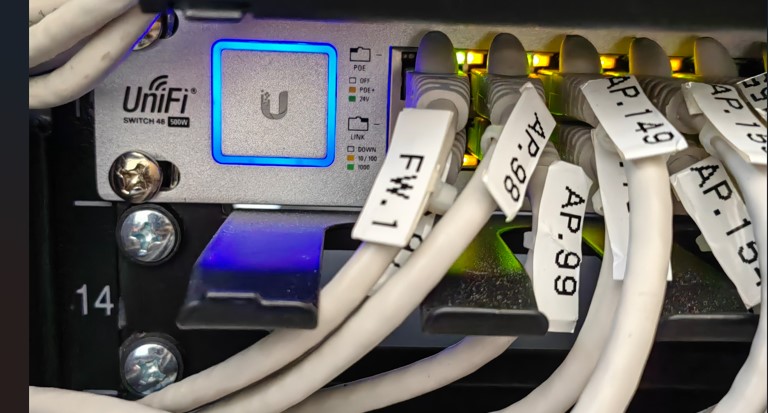
    Wifi6 with wireless controller

    The Ubiquiti UniFi Network Controller is a powerful software platform that allows you to manage your entire network from a single, easy-to-use interface. When paired with the Ubiquiti LR6 Series access points, it provides a high-performance and scalable wireless network solution that can meet the needs of even the most demanding environments.

    The Ubiquiti UniFi Network Controller is designed to simplify network management, allowing you to easily configure and monitor your entire network from a central location. With features such as real-time network monitoring, traffic analysis, and customizable alerts, you can ensure that your network is running smoothly and efficiently at all times.

    The Ubiquiti LR6 Series access points provide exceptional wireless performance, with support for high-speed 802.11ac Wi-Fi and the latest MIMO technology. They also feature a sleek, minimalist design that blends seamlessly into any environment, making them ideal for both commercial and residential installations.

    When used together, the Ubiquiti UniFi Network Controller and Ubiquiti LR6 Series access points provide a complete and powerful wireless networking solution that can meet the needs of businesses of all sizes. With advanced features such as guest access, VLAN support, and seamless roaming, you can ensure that your users have the connectivity and security they need to be productive.

    Overall, the Ubiquiti UniFi Network Controller with Ubiquiti LR6 Series access points is a powerful and reliable wireless networking solution that can provide exceptional performance and ease-of-use. Whether you are looking to upgrade your existing wireless network or deploy a new one from scratch, this solution can help you achieve your goals and meet the needs of your users.

    On-prem management option

    Run a dockerized Unifi network controller on-premise with Synology NAS. Manage your site network without the need for cloud key. Set configuration and install updates with a single click.