When trying to extend your wireless coverage to an area where it is hard to reach and it is close to ethernet cable length limit, a range extender may not be a good idea. Rather, a wireless point-to-point network will bridge the gap and provide a wireless backhaul from your perimeter back to your main site.
With the correct access point deployed and proper planning, it can even be an outdoor area that is extended from indoor or an area with limited line of sight.
Check with us for solution on providing wifi coverage to stretch existing network to cover your perimeters or nearby site office. Such features can usually be an option to running fiber cables and/or provide additional redundancy to support existing infrastructure.
A zero-day threat refers to a security vulnerability or software flaw that is discovered by cyber attackers before the software vendor becomes aware of it. As a result, there is no patch or fix available to defend against the threat, making it particularly dangerous.
Zero-day threat protection is a cybersecurity strategy designed to defend against threats that exploit previously unknown vulnerabilities in software or hardware. These vulnerabilities are called “zero-day vulnerabilities” because they are discovered by attackers before the software vendor is aware of them, leaving zero days for the vendor to develop and release a patch.
Zero-day threat protection typically involves a combination of proactive and reactive measures to detect and mitigate zero-day attacks. Here’s how it generally works:
Behavior-based Analysis: One approach to zero-day threat protection is behavior-based analysis. Security solutions monitor the behavior of files, applications, and network traffic in real-time. If an unknown file exhibits suspicious or malicious behavior, the security system may quarantine or block it to prevent potential harm.
Heuristics and Machine Learning: Security tools use heuristics and machine learning algorithms to identify patterns and behaviors associated with malware and exploits. They compare files and code against known threat profiles to identify potential zero-day threats.
Sandboxing: Some security solutions use sandboxing to analyze potentially malicious files or code in a controlled environment. Sandboxing isolates suspicious files from the main system, allowing security experts to observe their behavior without risking the host system’s security.
Threat Intelligence Sharing: Companies and organizations often share threat intelligence and information about zero-day threats with each other and security vendors. This collaboration helps identify and respond to new threats more effectively.
Rapid Patching and Updates: When zero-day vulnerabilities are discovered, software vendors work swiftly to develop patches and updates to fix the vulnerabilities. Users are urged to apply these patches as soon as they become available to protect their systems.
Security Policies and Access Controls: Implementing robust security policies and access controls can limit the attack surface and reduce the impact of zero-day threats. By restricting unnecessary privileges and controlling access to critical systems, organizations can minimize the potential damage.
User Education and Awareness: Educating users about the risks of social engineering attacks, phishing emails, and malicious downloads can help prevent zero-day exploits. Encouraging users to be cautious and vigilant can reduce the likelihood of successful attacks.
While zero-day threat protection strategies can significantly reduce the risk of zero-day attacks, no security measure is foolproof. The cybersecurity landscape is constantly evolving, and attackers are continually developing new techniques. A multi-layered security approach that includes regular updates, strong access controls, user education, and threat intelligence sharing is crucial for a comprehensive defense against zero-day threats.
Zero Trust is a network security concept and architectural approach that challenges the traditional perimeter-based security model. In a Zero Trust model, trust is never assumed, regardless of whether a user or device is inside or outside the corporate network. Instead, every request for access to resources is carefully verified and authenticated before being granted, regardless of the user’s location.
The core principles of Zero Trust include:
Verify and Authenticate: All users, devices, and applications attempting to access resources must be verified and authenticated before access is granted. This involves using strong identity verification methods like multi-factor authentication (MFA) to ensure the user’s identity.
Least Privilege: Users and devices are granted the least amount of privileges necessary to perform their tasks. This principle ensures that even if a user’s credentials are compromised, an attacker’s access to sensitive resources is limited.
Micro-Segmentation: The network is divided into smaller, isolated segments or zones to reduce the potential impact of a security breach. Each segment has its own security policies and controls, and communication between segments is strictly regulated.
Continuous Monitoring: Continuous monitoring and analysis of user behavior, device health, and network traffic help detect anomalies and potential security threats in real-time.
Access Controls: Granular access controls are applied based on user identity, device health, and other contextual information. Access decisions are dynamically made based on this context.
Encryption: Data in transit and at rest is encrypted to protect sensitive information from unauthorized access.
Assume Breach: Zero Trust operates on the principle of “assume breach.” Instead of relying solely on prevention, the architecture assumes that threats are already inside the network and focuses on detection, containment, and response.
Zero Trust architecture is particularly relevant in today’s distributed and cloud-based environments, where the traditional perimeter-based security model is no longer sufficient to protect against sophisticated cyber threats. By adopting a Zero Trust approach, organizations can strengthen their security posture, reduce the attack surface, and improve the overall resilience of their network against modern cyber threats.
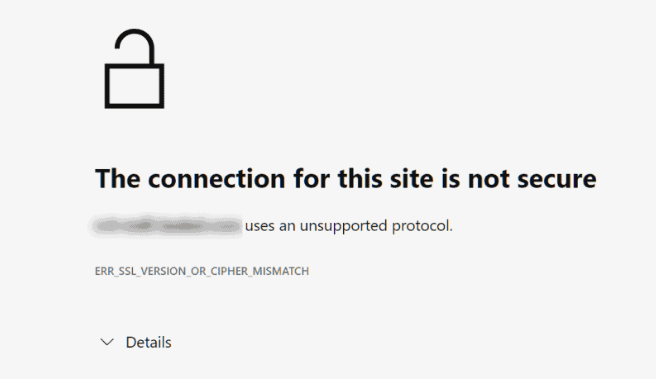
The “cipher mismatch error” typically occurs in the context of secure internet connections when there is a mismatch between the encryption algorithms supported by the client (usually a web browser) and the server it is trying to connect to. This issue prevents the establishment of a secure and encrypted connection, leading to an error message being displayed to the user.
Besides network error, common cause could be due to outdated web browser, outdated server SSL/TLS Configuration, server misconfiguration, expired SSL/TLS certificates and incompatible cipher suites.
Much has changed since 2021 after the disabling of support for TLS1.1. Many modern browsers no longer support any SSL/TLS version prior to 1.2.
There may be reason that you would want access to an old router or firewall, to access some old configuration, to backup config or check network info.
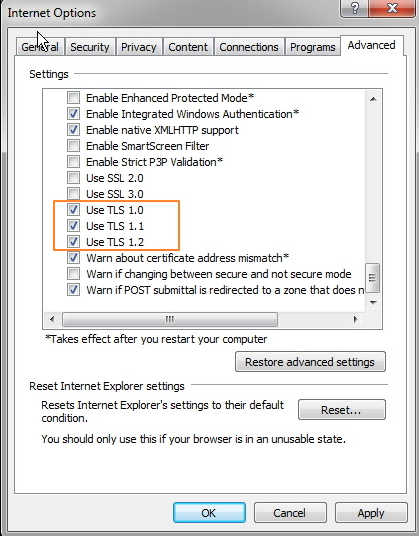
You may need to enable TLS 1.0, TLS 1.1 and for even older router SSL protocols in order to access the router’s web admin portal. Just remember to reverse the process once you’re done.
You may also need to use Internet Explorer (no longer available in Windows 11) as all newer versions of Chrome/Firefox/Opera do not support the older protocols.
If you’re insistent on not using IE, you may need to look for versions prior to Chrome 84, Edge 84, Firefox 78, & Safari 14 in order for TLS 1.0 to work.
Doctor Web, an anti-virus company, has uncovered a malicious Linux program called Linux.BackDoor.WordPressExploit.1 that targets websites using WordPress CMS. The malware exploits 30 vulnerabilities found in various plugins and themes for WordPress. If websites are using outdated versions of these add-ons without crucial fixes, the malware injects malicious JavaScript into their pages. This results in users being redirected to other websites when they click on any area of the attacked page.
The trojan is remotely controlled by cybercriminals, allowing them to attack specified websites, switch to standby mode, shut itself down, and pause logging its actions. It primarily focuses on hacking WordPress-based websites and injecting malicious scripts into their webpages by using known vulnerabilities in plugins and themes. The trojan collects statistics on its attacks and reports back to the C&C (command and control) server.
Additionally, Doctor Web discovered an updated version of the trojan called Linux.BackDoor.WordPressExploit.2, which has some differences in C&C server address and the list of exploited vulnerabilities.
To protect against this threat, website owners are advised to keep their WordPress platform and all its components, including third-party add-ons and themes, up-to-date. Strong and unique logins and passwords should also be used for website accounts.
WordPress plugins vulnerable are unpatched version of:
Brizy WordPress Plugin
FV Flowplayer Video Player
WooCommerce
WordPress Coming Soon Page
WordPress theme OneTone
Simple Fields WordPress Plugin
WordPress Delucks SEO plugin
Poll, Survey, Form & Quiz Maker by OpinionStage
Social Metrics Tracker
WPeMatico RSS Feed Fetcher
Rich Reviews plugin
Worry about insufficient IT security? Protect your corporate network with Dr Web Security Suite now.
Apple released an emergency bug fix, known as the Rapid Response patch, to address a web-browsing security hole used in real-world spyware attacks. The bug, identified as CVE-2023-37450, could lead to arbitrary code execution and had reportedly been actively exploited. The attack involved a look-and-get-pwned technique, where simply viewing a malicious web page could invisibly implant malware on the device without clicking or approving any pop-ups.
The update fixed the WebKit bug and another kernel-level code execution bug, identified as CVE-2023-38606. These updates were released for various Apple operating systems, including iOS, iPadOS, macOS, tvOS, and watchOS.
Users are advised to promptly download and install these updates to protect against known and potential exploits. Additionally, these updates addressed other cybersecurity flaws, including elevation-of-privilege bugs and data leakage flaws. It is crucial to keep Apple devices up to date to safeguard against current and future threats.
Microsoft published a report called “Analysis of Storm-0558 techniques for unauthorized email access.” The report revealed a cyberattack on approximately 25 organizations, including government agencies and consumer accounts in the public cloud. Although only 25 organizations were attacked, it could have affected many individuals as some government bodies employ a large number of people.
The attack exploited two security flaws in Microsoft’s back-end operations, which the company could fix internally without requiring client-side software updates. The attack used unauthorized access to victims’ Exchange data via Outlook Web Access (OWA) using illicitly acquired authentication tokens.
The attackers managed to use fraudulent email interactions to sneak into the victims’ systems, indicating they had compromised the process of creating authentication tokens. They were able to generate fake authentication tokens that passed Microsoft’s security checks, leading to unauthorized access.
Microsoft’s threat hunters identified the attack’s nature and concluded that the affected customers’ list is exhaustive. They have taken measures within their cloud service to address the issues and disown stolen signing keys.
For those not contacted by Microsoft, it is likely they were not affected. However, those involved in IT should remember the importance of applied cryptography, security segmentation, and thorough threat hunting to ensure comprehensive cybersecurity.
RSS Error: Retrieved unsupported status code "404"
SOPHOS
RSS Error: A feed could not be found at `https://nakedsecurity.sophos.com/feed/`; the status code is `200` and content-type is `text/html; charset=utf-8`
Malware is a huge issue when everyone is connected virtually in someway.
It can also be a ransomware that encrypt your system and allow remote access to your system and your corporate network.
Most come with a payload to spread itself to other users in your environment or associates in your contact list.
Removal is difficult as some malwares are rootkits, meaning they start themselves as a system service.
Ever get those anti-virus prompt of virus removal that keeps coming up after removal? That is likely a rootkit malware. Usually this will require creating a boot disk and using an image from the antivirus company that scan through your hard disk without starting Windows.
Malware Removal then System Repair? Why not do both with just one software?
There may be system file damage, traces of temp files of viruses/spywares waiting to reload and system registry cleaning up to be done.
Instead of using a magnitude of software to clean and optimize your, why no just use software to achieve this.
Powerful technology that secures and safely repairs any PC to an optimized state. It’s the one software any PC user ever needed.
Malwares in the wild now includes Nevada ransomware, Python RAT, HeadCrab malware, PlugX malware with the last one being quite rampant.
We provide virus and malware removal service, however note that decrypting ransomware is not possible.
While generic routers don’t differentiate malicious outbound traffics from legit ones, a good hardware firewall at your network perimeter can generally detect suspicious activities on endpoints.
You can contact us for firewall solution catered to your environment. If you require malware removal service, please contact us at +65 96944441.